
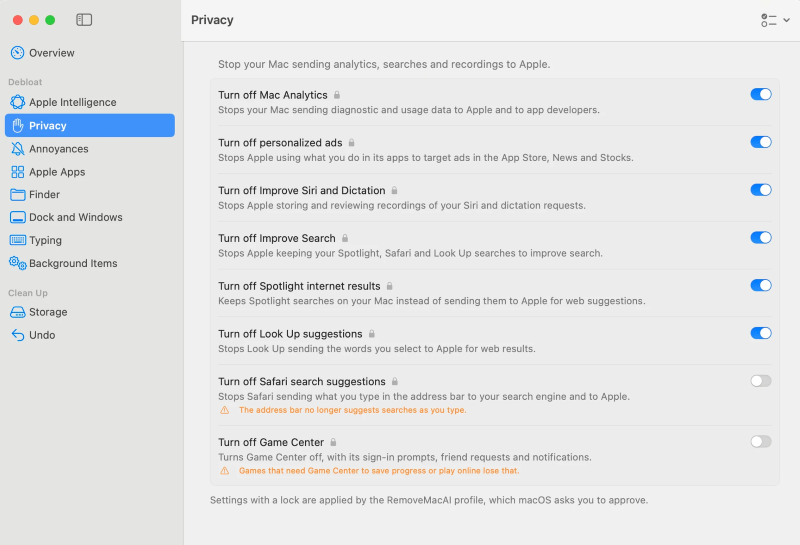
Apple users increasingly face issues with involuntary AI injection similar to the experiences reported by Windows users. As artificial intelligence integration becomes a standard expectation across operating systems, consumer pushback has grown against bundled features that users neither requested nor want. To address this friction, a utility called RemoveMacAI has emerged on GitHub, offering consumers a way to purge unwanted artificial intelligence components from their computers.
What Changed
The release of the macOS 27 update brought a wave of deeply integrated artificial intelligence components to Apple devices, drawing annoyance from users who viewed these additions as unwanted free gifts forced upon them. In response, independent developers created RemoveMacAI, a specialized utility hosted on GitHub. This tool enables users to strip out AI bloatware, completely disable Apple Intelligence, delete associated artificial intelligence models, and clean out old macOS installers that linger on local drives.
According to reporting highlighted by PC Perspective and Jeremy Hellstrom on October 7, 2026, utilizing this tool allows affected users to regain approximately 10 to 12 gigabytes of storage space. Rather than forcing a blunt script onto the system, RemoveMacAI presents a graphical user interface window upon installation. This interface allows individuals to carefully pick and choose specific items to remove, or alternatively select predefined configuration presets labeled ‘Recommended’ or ‘Maximum privacy’.
Context and Background
For years, operating system updates have included bundled software utilities, applications, and system-level features designed to showcase new ecosystem capabilities. However, the aggressive push toward artificial intelligence integration has crossed a threshold where system resources, background processing, and storage footprints are significantly affected without user consent. Windows users have long voiced frustrations over forced AI features and copilot integrations. Now, Apple device owners are finding themselves grappling with parallel challenges.
Apple’s implementation introduced numerous systemic AI touchpoints. These include enhanced Siri functions, ChatGPT integrations, custom emoji generation tools known as Genmoji, writing assistance text boxes, automated notification and application content summaries, and automatic photo clean-up utilities. For users who prefer a traditional, streamlined operating system environment, these capabilities represent unwanted bloat rather than productivity enhancements.
Technical and Business Explanation
RemoveMacAI operates by targeting the underlying directories and system frameworks responsible for running Apple’s artificial intelligence ecosystem. By isolating the specific packages tied to Siri AI, ChatGPT extensions, Genmoji generation engines, text summarization tools, and photo clean-up models, the software purges these files from the local storage volume.
From a technical perspective, artificial intelligence models require substantial local file storage and background memory allocation. Deleting these models accounts for the notable recovery of 10 to 12GB of space. The inclusion of a graphical user interface lowers the technical barrier to entry, ensuring that users do not need to execute raw command-line scripts to clean their machines. Furthermore, the GitHub repository provides full documentation, allowing technical users to audit what RemoveMacAI does before initiating the installation process.
Key Benefits
The primary advantages of employing RemoveMacAI include:
- Storage Recovery: Users reclaim 10 to 12GB of valuable local drive space previously consumed by heavy artificial intelligence models and old macOS installers.
- Granular Control: The graphical user interface offers pick-and-choose functionality alongside automated presets like ‘Recommended’ and ‘Maximum privacy’.
- Reduced System Clutter: Eliminates unwanted interface elements such as writing assistance boxes, notification summaries, and automatic photo clean-up routines.
- Transparency: The open-source nature of the GitHub repository allows users to inspect the codebase and understand precisely which files and extensions are targeted.
Risks and Limitations
While the utility offers an appealing solution for those looking to declutter their operating systems, users must weigh potential risks and limitations:
- Ecosystem Compatibility: Modifying core operating system files via third-party tools can lead to unexpected behaviors or break future system updates, especially given that macOS 27 nomenclature may vary depending on official release designations.
- Loss of Functionality: Stripping out Siri AI, ChatGPT extensions, Genmoji, and system summarization tools permanently disables those specific capabilities across the device.
- Attribution and Support: Because RemoveMacAI is an independent, community-driven GitHub project rather than an officially supported Apple utility, users assume all responsibility for any system instability resulting from modifications.
Who May Be Affected
This development directly impacts Apple device owners who updated their operating systems and subsequently experienced frustration over unwanted artificial intelligence features. It also serves as a point of interest for privacy advocates, system administrators managing enterprise fleets, and minimalists seeking to optimize hardware performance by stripping out unused background services.
What to Watch Next
Observers will monitor how Apple responds to third-party tools designed to dismantle its flagship software features. As the debate over involuntary AI injection continues across both Windows and macOS ecosystems, the popularity of tools like RemoveMacAI may influence how major technology companies approach opt-in versus opt-out mechanisms for software updates in future operating system cycles.